More than a shared family calendar. A way to actually get it covered.
Add a pickup by typing it like a text
Type "Ask Grandma Emily to pick up Anthony from daycare at 4" the way you'd text a friend. Nuggget reads it and builds the scheduled handoff for you. No forms, no fiddly dropdowns.
Nuggget does the asking
Helpers get a push in their own simple app, or a plain text if they don't have it. One tap to say "I've got this," and you see it instantly. No group thread.
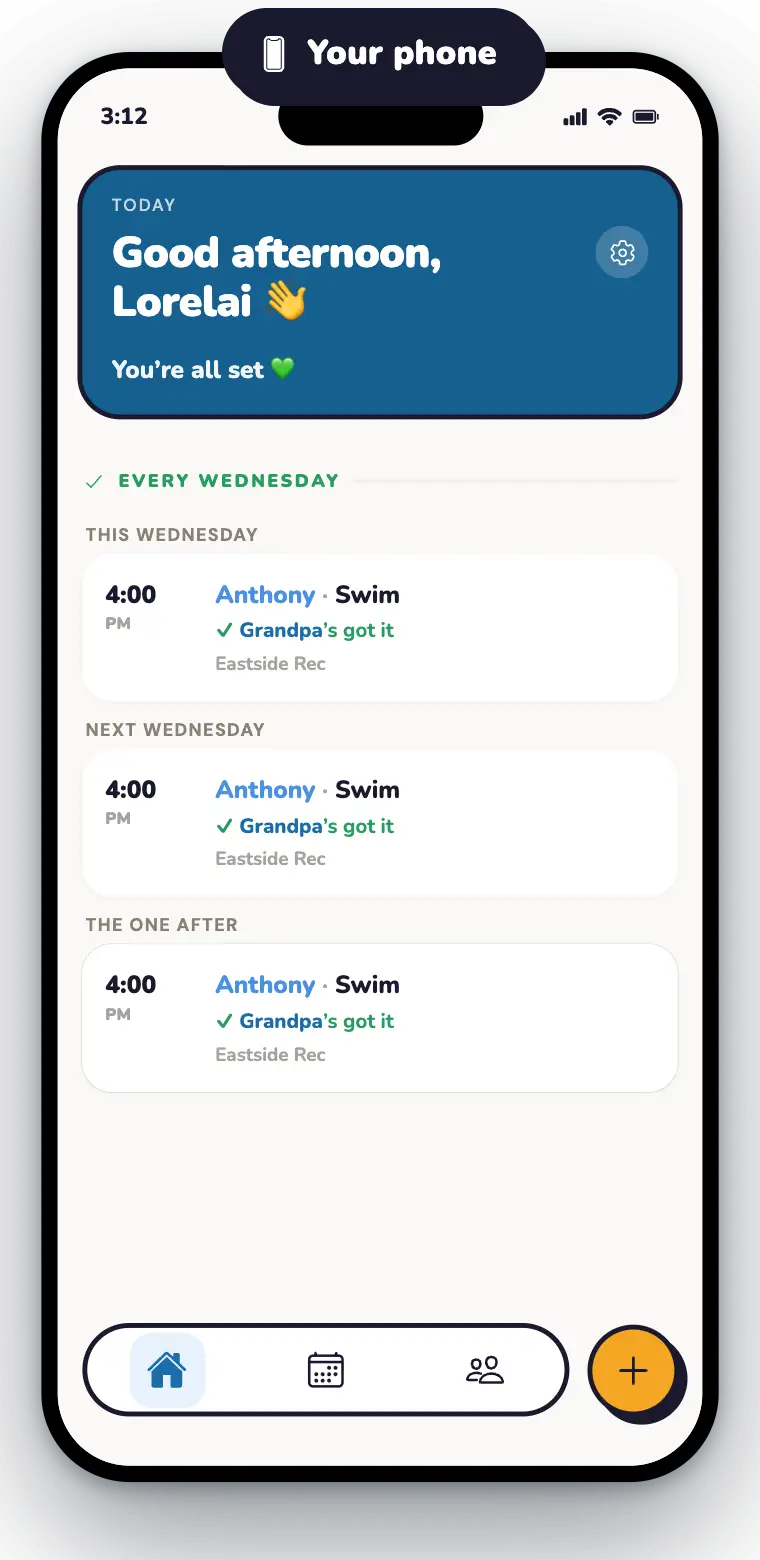
The whole day, one glance
Every school run, practice and pickup, who's got it, and what's still open. Gaps get flagged, not discovered at 4pm. And when a helper taps "I've got this," you see it right away. No "are you getting her?" text.
School pickups, sorted in three taps.
Type what you need
An activity, a pickup, a favor, in plain words. Nuggget works out the who, when and where.
Nuggget asks your helper
A push in their helper app, or a text if they don't have it. One tap to say yes.
You'll know before you can ask
Home shows every leg covered, and tells you the moment a helper says yes.
For grandparents, sitters, and neighbors: saying yes takes one tap.
Grandma, the sitter, a neighbor. Helpers get their own simple view. Just the requests that need them, where to be, and when to leave. No account juggling, no group threads to scroll.
Give your head the week off.
Bring your family, run a real week through it, and tell us what's clunky. You'll help shape what ships next.
Two steps on iPhone: get TestFlight, Apple's app for trying apps early, then tap Join the free beta again. On Android? It's on Google Play.
Installs straight from Google Play, no invite and no tester list. On iPhone? It's on TestFlight.
On a computer? Point your phone's camera here to install.


Questions parents ask
Is Nuggget a shared family calendar?
It works with one, but it does a different job. A calendar shows what's happening. Nuggget makes sure someone has actually said "I've got this" for every pickup and drop-off, and reminds them when it's time.
Can grandparents really use it?
Yes, that's the whole point. Helpers get their own simple app that shows only what they're on for: where to be, when to leave, one tap to say yes. If they can read a text, they can use Nuggget.
Does Grandma need to download the app?
No. If she doesn't have it, she gets a plain text and can answer from there. The helper app is nicer, with reminders and her schedule in one place, but it's optional.
Can Grandpa take the same pickup every week?
Yes. Type it once, like "Ask Grandpa to take Anthony to swim every Wednesday at 4." He says yes one time, gets a nudge before each one, and you never re-ask.
What if the sitter can't make it?
They tap "Can't make it" and you get a push right away. The pickup comes back to you, so you can ask someone else while there's still time.
Does it work for co-parents, even across two homes?
Yes. Both parents see the full schedule, even if you live apart, and either can add a pickup or hand one off. No more forwarding screenshots of the calendar.
How do I add the babysitter or a neighbor?
Send them a code from the app. They join with their phone number, and from then on you can ask them to cover a pickup with one tap.
Who can see my kids' schedule?
Only your family. Co-parents see everything, and helpers see only the pickups they've been asked to cover. We don't sell your data.
Does my kids' school need to use Nuggget?
No. Nuggget is for your family and the people who help you, not the school's dismissal line. Nothing to sign up for at school.
What does it cost?
Nothing while we're in open beta. Bring your family, run a real week through it, and tell us what's clunky.
Which phones does it work on?
Nuggget runs on both. On iPhone you join the beta through TestFlight, Apple's app for trying apps before they're released. On Android it installs straight from Google Play. Either way it takes about a minute.