
How Nuggget Texts Helpers
Everything about our SMS consent process, message types, and how to opt out, in plain language.
What Nuggget Is
Nuggget is a family coordination app. Parents use it to assign childcare tasks, like school pickups and activity drop-offs, to trusted people in their network (grandparents, babysitters, family friends). When a parent adds a helper, Nuggget texts that helper once to ask if they're in. Only after the helper replies does Nuggget text them about tasks the parent assigns.
How Consent Works
Helpers receive their first message the moment a parent adds them, before any task exists. That welcome message asks them to reply if they're in. It identifies Nuggget by name, names the parent who added them, explains what the texts will be for, and tells them how to opt out. No task message is sent to a helper until they reply to it. Adding someone does not enroll them in anything.
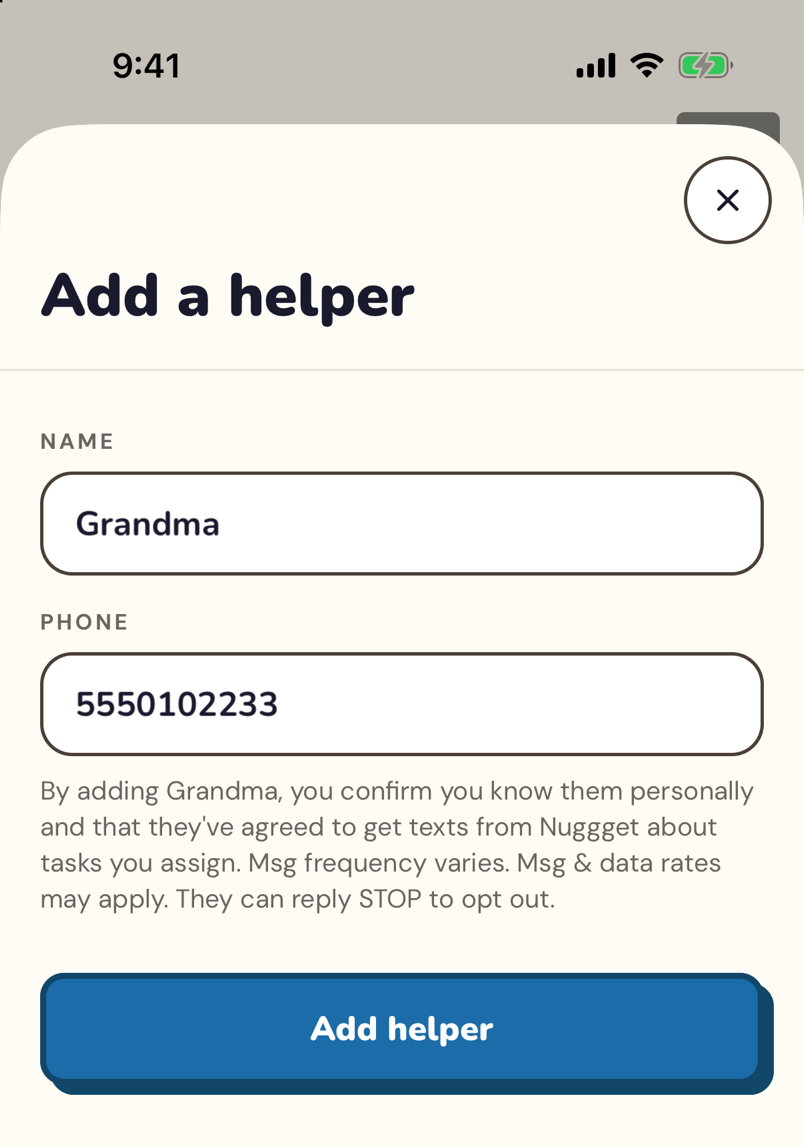
Parent adds a helper, and the opt-in SMS goes out
A subscribing parent enters a helper's name and phone number in the Nuggget app. By doing so, the parent confirms (per our Terms of Service) that they have a pre-existing personal relationship with this person. Parents may not add strangers or anyone without a prior personal connection.
Nuggget then sends that person a single welcome message. This is their first contact and the call to action: it names Nuggget, names the parent who added them, says what the texts will be for, asks them to reply if they're in, and carries opt-out instructions.
Helper replies to opt in
The helper opts in by replying to the welcome message. Their reply is the consent: Nuggget answers once with a confirmation that repeats the message frequency, the message and data rates disclosure, and the HELP and STOP instructions. If the helper never replies, or replies STOP, they receive no task messages at all.
Parent creates a task, and the helper gets a task request
The parent assigns a specific childcare task, for example "Grandma picks up Emma from soccer on Wednesday at 5:30pm." The opted-in helper receives a text with the task details and a link to full details, and replies YES to accept or NO to decline.
Reminders for accepted tasks only
A helper who accepts gets a day-of reminder before the task, and a short morning summary on days they have an accepted task. The parent is notified in the app (by push). Replying STOP at any point permanently stops all messages.
What Helpers Actually Receive
The welcome message and the opt-in confirmation identify Nuggget by name and give opt-out instructions before any task message is sent. Task requests carry the task details and a link to full details (phone-verified). Here's what a real exchange looks like.
Respond to this message if you're in
Want quicker access next time? Grab the app: nuggget.app/join?code=[code]
Reply STOP anytime to opt out 💛
Reply YES to confirm or NO if you can't make it 💛
Full details: nuggget.app/t/[secure-link]
If the helper replies STOP
The helper is immediately and permanently removed from all future messages. Twilio, our messaging provider, handles the opt-out at the carrier level and sends the confirmation automatically; Nuggget's own systems send nothing further. Inside the app, Nuggget cancels every task still assigned to that helper and notifies the parent that they have opted out.
All Message Types Sent
Nuggget sends only transactional messages, each triggered by a parent action in the app (adding a helper or creating a task) or by the helper's own reply. We never send marketing, promotional, or unsolicited messages.
| Message Type | When Sent | Who Receives It |
|---|---|---|
| Welcome / opt-in message | When a parent first adds this person as a helper — and again if they're removed, then re-added later | The new helper, before any task is ever sent to them |
| Opt-in confirmation | Once, when the helper first replies to the welcome message (any reply except STOP) | The helper who replied |
| Task request | When a parent creates a task and assigns it to a helper who has opted in | The assigned helper |
| Acceptance confirmation | Immediately after the helper replies YES | Parent(s) — in-app push only today; no SMS is sent for this |
| Day-of reminder | (Helper's own lead-time preference + 30 min) before their pickup/drop-off leg — 60 min before by default if they haven't set a preference | Helper who accepted the task |
| Arrival confirmation | When GPS, or a manual tap, confirms the helper has arrived | Parent(s) — in-app push only today; no SMS is sent for this |
| Helper daily digest | ~7:00am in the helper's own local time, only on a day they have at least one accepted task | Helper |
| HELP reply | When a helper replies HELP | The helper who asked |
| Opt-out confirmation | Automatically, by the carrier/Twilio, the moment a helper replies STOP | Helper who opted out |
| Co-parent account-deletion notice | When the other parent deletes the shared family account | The co-parent — direct SMS to their phone, not a helper message |
Push notifications are tried first
For every message type sent to a helper (the welcome message, task requests, the day-of reminder, the daily digest), Nuggget tries an in-app push notification first if that helper has the Nuggget app installed. SMS goes out only when they haven't installed the app, or the push notification fails to deliver — this is also why a helper who never installs the app still gets fully reachable by text. The two message types sent to a parent (acceptance and arrival confirmations) are in-app push only right now, with no SMS fallback; the co-parent account-deletion notice is the one parent-facing message sent directly by SMS.
What we never send
- Marketing or promotional messages
- Messages to anyone who has replied STOP
- Messages about a task the helper hasn't been assigned to
- Messages from one family to a helper added by a different family
- Task messages to a helper who hasn't replied to the welcome message
- Any message that isn't triggered by a parent action in the app or the helper's own reply
Opting Out
Helpers can opt out at any time, no questions asked. Opt-out is immediate and permanent, no future messages are sent after a STOP reply.
Reply STOP to any message from Nuggget. Works from any message, at any time. Immediate and permanent. You'll receive one final confirmation that you've been unsubscribed.
Email hi@nuggget.app to request removal from all messages. We'll confirm within 24 hours.
Standard opt-out keywords
We support all standard CTIA opt-out keywords: STOP, STOPALL, UNSUBSCRIBE, CANCEL, END, QUIT. Any of these words permanently unsubscribes the number. To re-subscribe after opting out, reply START or UNSTOP.
Messaging Program Information
| Detail | Information |
|---|---|
| Program name | Nuggget Family Coordination |
| Operated by | Safe House Studio LLC, a Connecticut limited liability company (2389 Main St, STE 100, Glastonbury, CT 06033, USA) |
| Message purpose | Transactional, childcare task coordination only |
| Message frequency | Varies. Typically 2-5 messages per task assigned to a helper. No recurring scheduled broadcasts. |
| Carrier charges | Message and data rates may apply depending on your mobile carrier plan |
| Opt-out | Reply STOP to any message |
| Help | Reply HELP or email hi@nuggget.app |
| Supported carriers | All major US carriers |
| Data sharing | We do not share, sell, or provide your mobile phone number or messaging consent data to third parties or affiliates for marketing or promotional purposes. |
| Terms of Service | nuggget.app/tos |
| Privacy Policy | nuggget.app/privacy |
| Contact | hi@nuggget.app |
For carriers and compliance reviewers
This page documents Nuggget's SMS consent and opt-in flow for A2P 10DLC compliance purposes. All messages sent through Nuggget are transactional. Opt-in is a double opt-in: a parent adds a helper they know in the app (screenshot above), the helper receives one welcome message naming the brand, the purpose, and opt-out instructions, and the helper must reply to it before any task message is sent. No bulk or marketing messages are sent. Questions: hi@nuggget.app